Find the tool bench
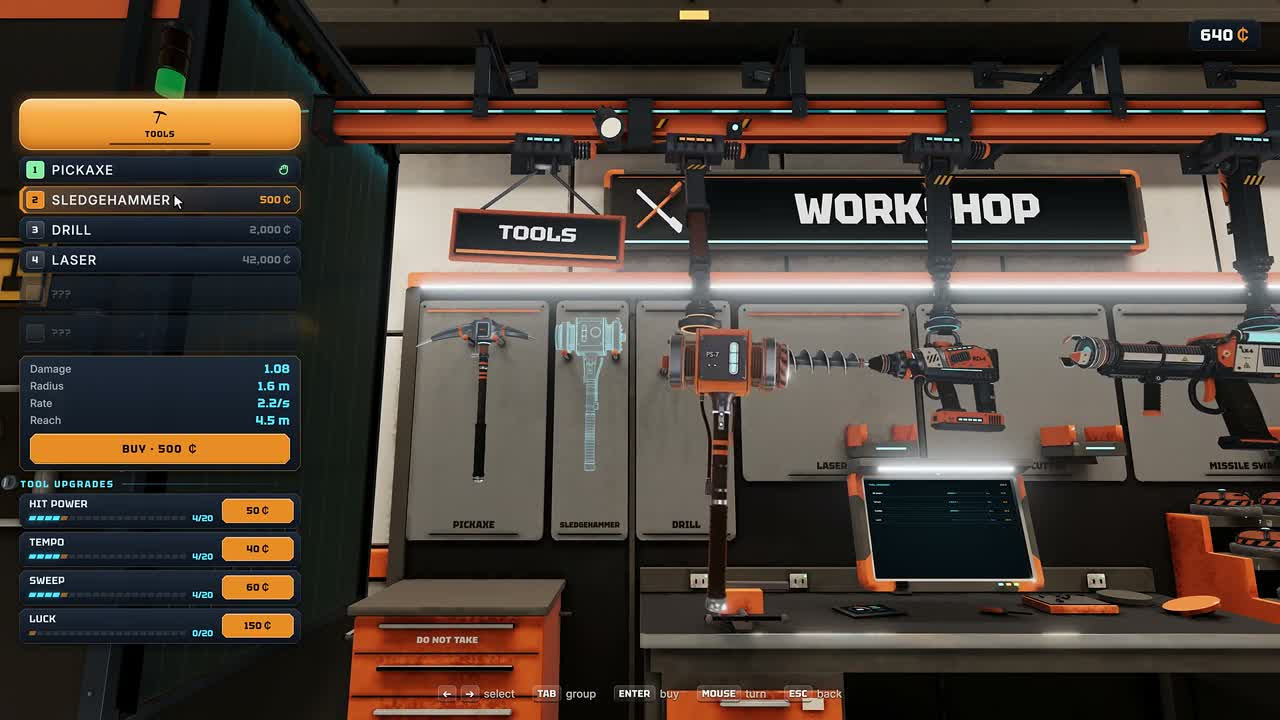
On the mothership, open Workshop → Tools. The roster includes the Pickaxe, Sledgehammer, Drill, Laser, Plasma Cutter, and Missile Swarm. Select a tool to read its current price and compare Hit Power, Tempo, Sweep, and Luck before spending.
Buy and equip the Sledgehammer
- Select Sledgehammer under Tools and check the Buy price against the balance.
- Choose Buy using the prompt in the Workshop. On keyboard this may be Enter.
- Check the In Hand label. Once back on the surface, check the tool name on the HUD before starting to mine.
If air or cargo space ends your shift before the tool does, open suit Diagnostics and compare the Air Tanks preview with the tool stats and what you can afford. The early upgrade guide shows how to make that comparison. If your Drill animates and the ore stays put, check the input and the mineral label.
Buy and use the Tether
- Open the suit Diagnostics menu on the ship. Select Tether, check the price, and choose Buy. Confirm that it changes from 0/4 to 1/4. One demo run showed 900 for the first level. Use the price on your panel.
- On the asteroid, press R on the default demo keyboard controls. Look for the tether line and watch the distance to the lander decrease as the tether pulls you in.
- Once the hatch is in range, use the E boarding prompt. The November 22 update lets players board while still being pulled as soon as the interaction is available. If the line snags on an older build, approach the hatch directly and try the boarding prompt again.